
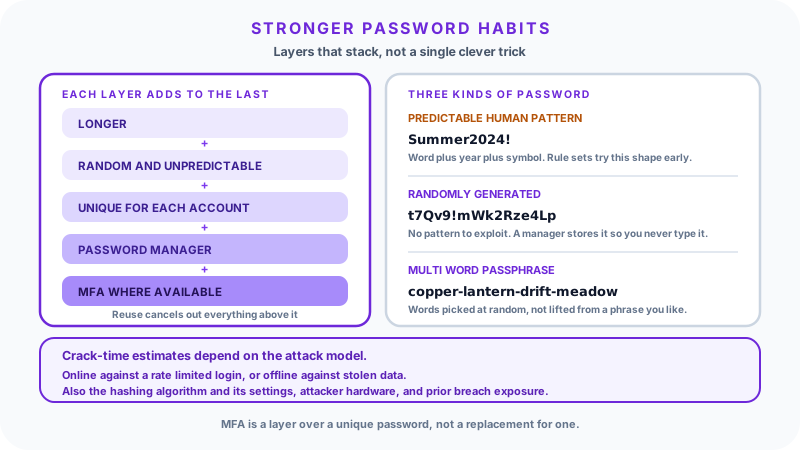
Most people meet the same wall every few weeks. A site rejects an easy password and hints vaguely about adding a symbol. So people add a "1" and a "!" to a word they already use and move on. That habit is exactly what attackers count on. A strong password is not about clever symbols. It is about being hard to guess, hard to crack, and never reused on accounts that matter.
The three attacks a password has to survive
Password advice makes far more sense once you separate the three things that actually happen to credentials in the real world. They have different defences, and only one of them is about how clever your password looks.
Guessing is the low-volume, targeted case. Someone who knows something about you tries names, dates, pets, teams, and the small variations people reach for. It does not need much computing power. It is defeated by not being predictable.
Credential stuffing is the highest-volume case and, for most people, the biggest practical risk. A site gets breached, the email and password pairs leak, and automated tools replay those pairs across hundreds of other services. Nothing is being cracked here at all: the attacker already has your password and is simply checking where else it works. The only defence is not reusing it.
Cracking is the case people picture: software making enormous numbers of guesses against stolen password data. This is where "how strong is my password" questions belong, and where the answer depends heavily on circumstances that have nothing to do with you.
Online versus offline: why crack times are not a fixed fact
You have probably seen a chart claiming a given password takes some number of years to crack. Those figures are not wrong so much as incomplete. They describe one specific scenario, and changing the scenario changes the answer by orders of magnitude.
Online guessing means an attacker submitting attempts to a live login form. The service controls the pace. Rate limiting, lockouts after repeated failures, CAPTCHAs, and anomaly detection mean an attacker may get a handful of attempts per account before being throttled or blocked. In this setting even a modest password holds up, because the attacker never gets enough attempts for raw speed to matter.
Offline cracking means an attacker has stolen the site's stored password data and is working on their own hardware, with no rate limit at all. Here the speed depends almost entirely on choices the site made, not choices you made:
- The hashing algorithm. Sites do not store your password directly; they store a hash of it. A fast general-purpose hash such as unsalted SHA-1 or MD5 was never designed for this job and can be attempted at enormous rates. A purpose-built password hash such as Argon2, scrypt, or bcrypt is deliberately slow and memory-hungry, which can reduce an attacker's throughput by many orders of magnitude for the same hardware.
- The configuration. The same algorithm tuned with a low work factor is far weaker than one tuned properly. Salting, which makes each stored hash unique, is what stops one precomputed table from cracking every account at once.
- The attacker's hardware and budget. A single consumer GPU and a rented cluster are very different adversaries.
- The structure of your password. Attackers do not iterate blindly through every combination. They run dictionaries, leaked-password lists, and rule sets that apply the substitutions humans favour. A password built from a known word plus a predictable twist is reached early in that ordering, regardless of how many characters it has.
- Prior breach exposure. If your exact password already appears in a public breach corpus, its effective strength against a modern attack is close to zero. It is on the list that gets tried first.
Because all of those vary, a single "guesses per second" figure cannot be treated as universal, and no honest tool can promise you an exact crack time. What is dependable is the direction of the advice: more length and more genuine unpredictability increase the number of guesses required under every one of these models.
Length and unpredictability, not decoration
For a password that is genuinely unpredictable, each additional character multiplies the space an attacker has to search. That is why length is the lever worth pulling first.
The catch is the word unpredictable. Length only buys you that expansion when the added characters are not guessable in context. Password123456789 is long and nearly worthless, because it sits at the front of every wordlist. P@ssw0rd demonstrates the other half of the problem: the substitutions of a to @ and o to 0 are standard transformations that cracking rule sets apply automatically, so they add almost nothing while feeling clever.
A practical target for accounts that matter is at least 14 to 16 characters, generated randomly or built from several unrelated words. Email deserves the most care of all, because whoever controls your inbox can trigger password resets everywhere else.
Composition rules that demand one uppercase, one digit, and one symbol are worth understanding for what they are. They set a floor, and they nudge people toward the same predictable patterns, which is why modern guidance from NIST has moved away from mandating them in favour of length, screening against breached password lists, and not forcing arbitrary rotation. Mixed character types help when the result is random. They do not rescue a short or patterned password.
Reuse is the risk that outranks strength
The single most damaging habit is using one password in more than one place, and it is worth stating plainly: a carefully constructed password becomes worthless the moment it is reused somewhere that gets breached.
Credential stuffing does not care how long your password is. One forgotten forum account can expose your email, shopping, and work logins if they share a password. This is also why breach notifications matter. Services such as Have I Been Pwned let you check whether an address appears in known breaches, and some password managers monitor this for you continuously.
The rule that follows is simple: every account gets its own password, and any password known to have been exposed gets replaced rather than reworked into a variant.
Passphrases and random strings
Two approaches produce strong passwords, and they suit different jobs.
A random password such as t7Qv9!mWk2Rze4Lp packs the most unpredictability into the fewest characters. It is the right choice for the great majority of your accounts, precisely because you never have to type or remember it: a manager fills it in.
A passphrase is several unrelated words joined together, such as copper-lantern-drift-meadow. Passphrases suit the small number of credentials you must recall unaided, such as a device login or your password manager's master password. The strength comes from choosing the words randomly and using enough of them, not from picking words that feel unusual. Words drawn from a favourite lyric, a quotation, or a phrase connected to you are far weaker than the character count suggests, because the attacker's dictionary can include phrases as easily as words.
Use random passwords where a manager fills them in. Use passphrases where memory is the only option.
Generating passwords without human bias
People are poor random number generators. Asked to invent a jumble, most of us alternate hands on the keyboard, favour certain letters, and put digits at the end. A generator removes that bias.
Use the Password Generator to produce a new password, set the length to 16 or more for important accounts, and allow a mix of character types. If you need a random value for something that is not a login, such as an API token or a unique identifier, the Random String Generator gives you direct control over the character set and length. Either way, generate the value and store it in your manager rather than trying to hold it in your head.
Using a strength checker sensibly
A strength checker is a learning tool. The Password Strength Checker runs entirely in your browser and flags specific weaknesses: dictionary words, keyboard runs, dates, and common substitution patterns. That feedback is genuinely useful for building intuition about what "predictable" looks like.
Read any crack-time figure it shows as an illustration under one assumed attack model, not a prediction. As the section above explains, the real answer depends on the defending site's hashing choices and the attacker's resources, neither of which any checker can know. The pattern warnings are the more reliable output.
Test example passwords or freshly generated ones rather than credentials you currently rely on. The habit of never typing a live password into a tool that does not need it is worth keeping even when a specific tool is trustworthy.
Where a password manager fits
Everything above points to the same conclusion: unique, long, random passwords for every account are the right target, and no one can memorise dozens of them. A password manager resolves that tension. It generates the passwords, stores them encrypted, fills them in, and lets you carry one strong passphrase in your head instead of forty weak variations.
There is a second, less obvious benefit. Because a manager matches saved credentials to the site's actual domain, it will decline to autofill on a lookalike phishing page that a person might not notice. That is a real defence a memorised password cannot offer.
Trying to hold many complicated passwords in memory tends to fail in a specific way: people converge on one base pattern with small per-site tweaks. That looks like variety and behaves like reuse, since an attacker who sees two examples can often infer the rest. Delegating storage to software is what makes genuine uniqueness practical.
Multi-factor authentication as a second layer
Multi-factor authentication (MFA) requires something beyond the password, typically a code from an authenticator app, a hardware security key, or a passkey. Turn it on wherever it is offered, starting with email and your password manager.
MFA meaningfully reduces the damage a stolen password can do, and phishing-resistant forms such as security keys and passkeys are stronger than codes sent by SMS, which can be intercepted or redirected through SIM swapping. What MFA is not is a substitute for unique passwords. It is a second layer over a first one, and layers work best when neither has been quietly removed.
Practical examples
Daniel1990 is weak. A name paired with a birth year is among the first structures a guessing attack tries.
Tr0ub4dor&3 looks complex but is short and built on a dictionary word with the substitutions rule sets apply by default. It is more fragile than it appears.
9xL!pQ2vErT8sKmd is a strong random password: no pattern to exploit and enough length that offline cracking becomes an expensive proposition against a properly hashed database. Let a generator produce it and a manager store it.
river-cassette-pylon-velvet-07 is a strong passphrase. The words are unrelated to each other and to the person using it, the length is high, and it remains learnable as a master password.
Common mistakes
- Names, birthdays, and anniversaries, including those of family and pets.
- Keyboard patterns such as
qwerty,123456, or1qaz2wsx. - Single dictionary words, with or without letter substitutions.
- One base password with per-site tweaks. This behaves like reuse.
- Sharing passwords over chat or email, where they sit in plain text in someone else's archive.
- Keeping a password that has appeared in a breach, or building the replacement from it.
- Relying on MFA as a reason to leave a weak or reused password in place.
Quick checklist
- Use at least 14 to 16 characters on accounts that matter.
- Give every account its own password, generated rather than invented.
- Store them in a password manager; memorise one strong passphrase.
- Use a passphrase only where you genuinely need to recall it yourself.
- Avoid names, dates, keyboard runs, and common words.
- Turn on MFA where available, preferring an app or a security key over SMS.
- Check your email address against known breaches, and replace anything exposed.
- Never share passwords over chat or email.
No set of habits can make an account impossible to compromise, since much of the outcome depends on how a service stores and defends your credentials. What these habits do is remove the weaknesses attackers rely on most, and that is the part within your control.
FAQ
How long should a password be?
Aim for at least 14 to 16 characters on important accounts. Longer helps when the added characters are unpredictable; symbols expand the search space but do not rescue a short or patterned password.
Are passphrases as safe as random passwords?
A long passphrase of randomly chosen, unrelated words can be very strong and is far easier to remember. Random passwords pack more unpredictability into fewer characters, which is why they pair naturally with a manager that types them for you.
Do I need symbols and numbers in a password?
They help when the whole password is random. Length and unpredictability matter more, which is why current NIST guidance emphasises those over mandatory composition rules.
Is it safe to type a password into a strength checker?
Test example or newly generated passwords rather than ones you actively use. The Password Strength Checker runs in your browser, but not entering live credentials into any tool that does not need them is a habit worth keeping.
How often should I change my passwords?
Change one when you suspect exposure or a service reports a breach. Scheduled forced rotation tends to produce weaker, patterned passwords, which is why NIST no longer recommends it in the absence of evidence of compromise.
What is the safest way to remember many passwords?
Use a password manager. It stores a unique password for every account, so you memorise one strong passphrase and keep your second factor available.
Sources and further reading
- NIST Special Publication 800-63B, Digital Identity Guidelines, on password length, breach screening, and rotation:
- UK National Cyber Security Centre, password guidance and the three random words approach:
- OWASP Password Storage Cheat Sheet, on Argon2, scrypt, bcrypt, and work factors:
- OWASP Credential Stuffing Prevention Cheat Sheet: