
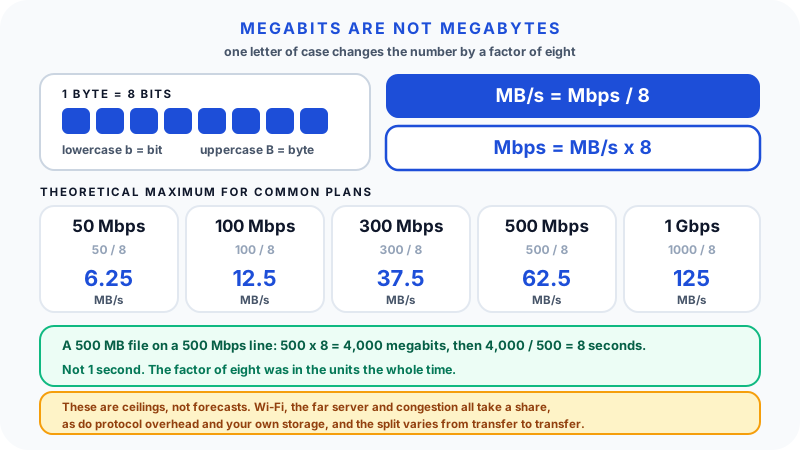
The complaint sounds like this: "I pay for 500 meg internet, so why does a 500 MB file not download in one second?"
The frustration is reasonable, because the numbers look like they should line up. They do not, and there are two separate reasons stacked on top of each other.
The first is a unit mismatch. Internet providers sell speed in megabits per second. Your computer shows files and download progress in megabytes. There are eight bits in a byte, so the plan number has to be divided by eight before it can be compared to anything in a download window at all.
The second is that a network is not a pipe with a guaranteed flow rate. Even after the conversion, real transfers lose ground to Wi-Fi conditions, the server at the other end, congestion, protocol overhead, and sometimes your own hardware. A speed test can be perfectly accurate and a download can still feel slow. Both things are true at once.
This guide covers the conversion exactly, then the practical reasons observed speeds land below it.
Bits travel, bytes store
A bit is the smallest unit of digital information, a single 0 or 1. Networks are measured in bits because that is what they move: streams of signals through cable, fibre, and radio.
A byte is a group of eight bits. Files, memory, and storage are measured in bytes because that is the convenient chunk for holding a character, a pixel value, or a piece of a video.
The letter case is the whole distinction, and it is easy to miss:
| Written | Reads as | Measures | Where you see it |
|---|---|---|---|
b | bit | one binary digit | network speeds |
B | byte | eight bits | file sizes |
Mbps | megabits per second | connection speed | your internet plan, speed tests |
MB/s | megabytes per second | transfer rate | download managers, file copy dialogs |
MB | megabytes | file size | the file itself |
MB/s and MBps mean the same thing; the slash form is more common in software because it is harder to misread. The lowercase b in Mbps is doing a lot of work, and a single capitalisation slip changes a number by a factor of eight.
The conversion, both directions
MB/s = Mbps / 8
Mbps = MB/s x 8
That is the entire arithmetic. Two worked examples:
Forward. A 300 Mbps plan. 300 / 8 = 37.5 MB/s. That is the theoretical ceiling for a single transfer on that line, before anything real happens to it.
Reverse. Your download manager reads a steady 6.8 MB/s and you want to know what that is in plan units. 6.8 x 8 = 54.4 Mbps. If you are paying for 60 Mbps, that transfer is running close to the line's capacity and there is very little missing.
Being able to run it backwards is the more useful skill, because it turns a number you can see into a number you can compare against your bill. The Data Storage Converter handles the unit side directly if you would rather not do it in your head.
Theoretical maximums for common plans
| Plan speed | Divide by 8 | Theoretical maximum | 1 GB file | 10 GB update |
|---|---|---|---|---|
| 50 Mbps | 50 / 8 | 6.25 MB/s | about 2 min 40 s | about 27 min |
| 100 Mbps | 100 / 8 | 12.5 MB/s | about 1 min 20 s | about 13 min |
| 300 Mbps | 300 / 8 | 37.5 MB/s | about 27 s | about 4.5 min |
| 500 Mbps | 500 / 8 | 62.5 MB/s | about 16 s | about 2.7 min |
| 1 Gbps (1,000 Mbps) | 1000 / 8 | 125 MB/s | about 8 s | about 1.3 min |
Read the right-hand columns as floors on time, not forecasts. They assume the server can send that fast, your router can pass it, your device can receive it, and nothing else on the network is competing. For anything other than round numbers, the Bandwidth Calculator does the file-size-to-time arithmetic, and the File Size Calculator is useful first when a file is quoted in KB, MB, GB, or TB and you want the scale straight before estimating.
Back to the original complaint
A 500 MB file on a 500 Mbps connection:
500 MB x 8       = 4,000 megabits
4,000 / 500 Mbps = 8 seconds
Eight seconds, not one. The factor of eight was always there; it just was not visible in either number as written. In practice a strong connection might finish that file in ten to fifteen seconds. On weak Wi-Fi it could take several times longer.
Why observed speeds land below the theoretical maximum
Dividing by eight gives a ceiling, not a promise. What sits between the ceiling and reality varies from transfer to transfer, which is exactly why no single "efficiency percentage" is worth memorising. The honest version is a list of candidates:
Protocol overhead. Every packet carries headers, addressing, error checking, and encryption alongside the data you asked for. TCP also opens a connection cautiously and ramps up, and re-sends anything lost along the way. This is normal packet-network behaviour, not a fault, and the size of the effect depends on the protocol, the packet size, and how clean the path is.
The server at the far end. A file host may cap each user, or be busy, or be geographically distant. Your line sets the maximum size of the pipe between you and the internet; it cannot make any particular server fill it.
Wi-Fi conditions. Distance, walls, interference, band, channel width, and how many devices are sharing airtime all move the number, sometimes minute to minute.
Congestion. Your household shares a router, your neighbourhood may share local infrastructure, and busy-hour slowdowns are common enough to be diagnostic: if speeds drop every evening at the same time, congestion is a reasonable suspect.
Single stream versus many. A speed test usually opens several parallel connections to nearby servers deliberately, to fill the line. A browser downloading one file over one connection has no such advantage.
Your own device. Slower storage, a busy disk, real-time virus scanning of the incoming file, or an older network adapter can all cap a transfer below what the line could deliver. This shows up most on gigabit connections, where 125 MB/s is fast enough that the receiving end starts to matter.
Any of these can dominate on a given day. That is why "my download was slower than plan speed divided by eight" is not by itself evidence of a problem.
Connection speed is not the same as download speed
Worth separating, because the two get quoted as if they were one thing:
- Connection speed is the capacity of the link between your home and your provider. It is what the plan sells, what a speed test measures, and it is quoted in Mbps.
- Download speed is the rate one particular transfer achieved, end to end, from one particular server, at one particular moment. It is what the progress bar shows, and it is usually quoted in MB/s.
The first is an upper bound on the second. They are measured differently, displayed in different units, and there is no reason to expect them to match after conversion.
One more source of confusion: MB and MiB
Even the file size can be quoted two ways. Storage and networking usually use decimal units, where 1 MB is 1,000,000 bytes. Some operating systems, Windows most visibly, display binary units but label them with decimal names: what it calls 1 GB is 1,073,741,824 bytes, properly written 1 GiB.
The gap is about 7% at gigabyte scale. So a file a download page calls "1 GB" may show as roughly 0.93 GB once saved, or a "1 GB" file measured in binary units takes about 7% longer to transfer than the decimal arithmetic above suggests. It is a small effect next to Wi-Fi or a throttled server, but it explains a persistent little discrepancy that has nothing to do with your connection. Why File Sizes Are Measured in KB, MB, and GB goes through how the units nest.
Why providers advertise in Mbps
Mbps is the standard engineering unit for network throughput, and it predates home broadband by a long way: telecoms have measured line capacity in bits per second since the network carried signals rather than files. So the unit is not invented for marketing.
It is fair to say the choice is convenient, though. "500 Mbps" reads better on a billboard than "62.5 MB/s", and both describe the same theoretical maximum. The real problem is not the unit's existence but that it sits next to file sizes in bytes with nothing flagging the difference.
Bandwidth is not latency
Bandwidth is how much data can move per second. Latency is how long a signal takes to make a round trip. Think of bandwidth as lane capacity and latency as reaction time: a wide road carries many cars, but if every light is slow the trip still drags.
This is why a stable 100 Mbps fibre connection can feel better for gaming than a 1 Gbps connection with poor Wi-Fi and high latency. Streaming a 4K video needs bandwidth. Online gaming needs low, consistent latency and often uses very little throughput. Video calls need moderate bandwidth in both directions plus low latency. Once a connection is comfortably fast, everyday browsing tends to be limited more by latency than by raw speed.
Upload is the number people forget
Many home plans are asymmetric: a plan might advertise 500 Mbps down and 20 Mbps up. That is fine for watching films, and it becomes painful when several people are on video calls, a cloud backup is running, or someone is uploading large files. Upload congestion also degrades downloads, because the acknowledgements that keep a download flowing have to travel upstream.
If calls stutter while downloads are fine, check the upload figure before blaming the plan's headline number.
Wi-Fi is often the real bottleneck
People often pay for faster internet when the weak link is the last few metres. A laptop beside the router may see 700 Mbps while a phone in a back bedroom sees 80 Mbps on the same plan.
The 2.4 GHz band travels further but is slower and more crowded. The 5 GHz band is faster but weakens through walls. Newer Wi-Fi generations add capacity, but only when router, device, and environment all support them, and a mesh system with a weak wireless link back to the main node can cap everything behind it.
If Ethernet is fast and Wi-Fi is slow, the provider is probably not the problem.
A troubleshooting order that saves time
- Convert first. Divide the plan speed by eight. If the download is in the right neighbourhood, there may be nothing wrong.
- Test near the router, using the Internet Speed Checker.
- Test again over Ethernet if you can. This separates the line from the Wi-Fi.
- Test where you actually use it. A large gap between this and step 2 points at Wi-Fi, not the provider.
- Try a different download source. One slow server proves nothing about the line.
- Check what else is running. Another device streaming, backing up, or downloading will take its share.
- Look at upload separately if calls and backups are the complaint.
- Sanity-check the expectation with the Bandwidth Calculator before concluding anything is broken.
If wired speed is far below plan at several times of day, the line deserves attention from your provider. If wired speed is strong and Wi-Fi is weak, fixing the local network will do more than upgrading the plan.
FAQ
What is the difference between Mbps and MB/s?
Mbps is megabits per second and measures connection speed. MB/s is megabytes per second and measures transfer rate. A byte is eight bits, so 80 Mbps is 10 MB/s at most.
How do I convert Mbps to MB/s?
Divide by eight. To go the other way, multiply by eight. A 100 Mbps plan tops out at 12.5 MB/s; an observed 4 MB/s download is using about 32 Mbps.
Why do internet providers advertise Mbps instead of MB/s?
Bits per second is the standard unit for network throughput and has been used in telecoms for decades. The larger-looking number is a convenient side effect rather than the original reason.
How fast should a 1 GB file download on 100 Mbps internet?
About 80 seconds at the theoretical maximum of 12.5 MB/s. In practice, somewhat longer, depending on Wi-Fi, the server, overhead, and what else is using the connection.
Why is my download slower than my speed test?
A speed test deliberately opens several connections to nearby servers to fill the line. A single download from one server, over one connection, possibly throttled at the far end, has none of those advantages.
Why does my computer show a different file size than the download page?
Some systems display binary units labelled with decimal names, so a file listed as 1 GB elsewhere may appear as about 0.93 GB locally. The file did not change; the unit convention did.
Does faster internet reduce ping?
Not directly. More bandwidth helps if the connection is saturated, but ping depends mainly on physical distance, routing, connection type, congestion, and Wi-Fi quality.
Why is gaming laggy when my speed test looks fine?
Games need low, stable latency far more than throughput. A high Mbps figure says nothing about jitter, packet loss, or the quality of the path to that particular game server.
The bottom line
Divide the plan's megabits by eight to get the ceiling, then expect real transfers to land under it by an amount that depends on the day, the server, and the Wi-Fi. Once those two steps are separate in your head, the gap between an advertised speed and a real download stops being mysterious and starts being diagnosable. If the byte units themselves still feel slippery, Why File Sizes Are Measured in KB, MB, and GB breaks down how the scale works, and because a smaller file always finishes sooner, How PDF Compression Works shows why shrinking a file is sometimes the faster fix.