
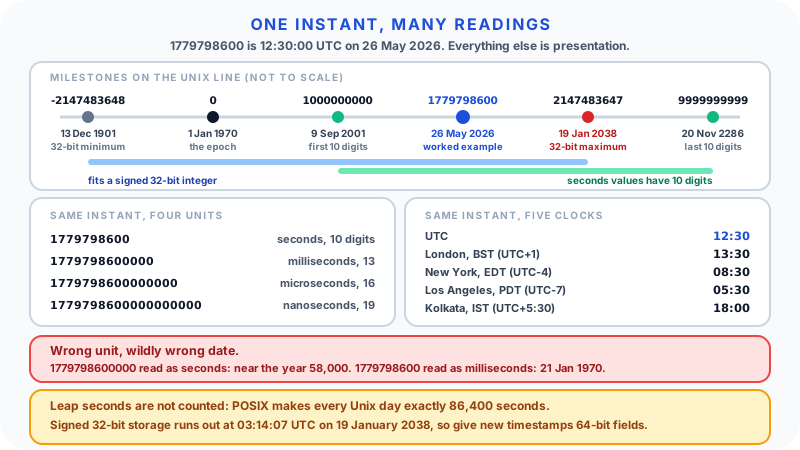
A Unix timestamp is a compact way for computers to store a moment in time. Instead of writing "26 May 2026 at 13:30 in London", a system can store a single number, 1779798600, that counts the seconds since a fixed starting point.
That starting point is the Unix epoch: 00:00:00 UTC on 1 January 1970. A timestamp of 0 means exactly that moment. A positive timestamp is a time after it, and a negative timestamp is a time before it.
Unix timestamps are everywhere in software: APIs, databases, server logs, analytics exports, payment systems, scheduled jobs, login tokens, and error reports. They are compact, easy to sort, and independent of language and region. They are also easy to misread if you mix up seconds and milliseconds, or UTC and local time.
What a Unix Timestamp Is
A Unix timestamp represents a point in time as a number. In its classic form, that number is a count of seconds since the Unix epoch.
For example:
0= 1970-01-01 00:00:00 UTC60= 1970-01-01 00:01:00 UTC3600= 1970-01-01 01:00:00 UTC86400= 1970-01-02 00:00:00 UTC
In Unix time every day is exactly 86,400 seconds long, so adding 86,400 always moves a timestamp forward by one calendar day in UTC.
A timestamp does not store a time zone. It stores an instant. Time zone conversion happens only when that instant is displayed to a person.
That is the key idea: the timestamp is the instant, and a readable date is one presentation of it.
The Unix Epoch
The Unix epoch is:
1970-01-01 00:00:00 UTC
UTC, Coordinated Universal Time, is the global reference time scale used in computing, aviation, science, and international systems.
Why 1970? It was a convenient, recent round date when early Unix systems settled on a time format. The choice is historical rather than meaningful. What matters is that systems agree on the same zero point.
Timestamps before 1970 are negative. For example, 1960-01-01 00:00:00 UTC is -315619200. The concept is valid, but some older software, file formats, and database columns only accept positive values, so test before relying on pre-1970 dates.
Seconds vs Milliseconds
The most common timestamp mistake is confusing seconds with milliseconds.
A seconds-based timestamp for a current date has 10 digits:
1779798600
A milliseconds-based timestamp for the same instant has 13 digits:
1779798600000
The millisecond value is the seconds value multiplied by 1,000. Different environments default to different units:
| Environment | Default unit |
|---|---|
Unix shell date +%s | Seconds |
PHP time() | Seconds |
Python time.time() | Seconds, as a floating-point number |
Python time.time_ns() | Nanoseconds, as an integer |
JavaScript Date.now() | Milliseconds |
Java System.currentTimeMillis() | Milliseconds |
| Databases | Varies by column type and driver |
Getting the unit wrong produces results that are wildly off rather than slightly off:
- Treat
1779798600000as seconds and you get a date around the year 58,000. - Treat
1779798600as milliseconds and you get 21 January 1970.
The digit-count rule of thumb
- 10 digits usually means seconds.
- 13 digits usually means milliseconds.
- 16 digits usually means microseconds.
- 19 digits usually means nanoseconds.
The 10-digit rule holds for every date from 9 September 2001 (1000000000) to 20 November 2286 (9999999999), which covers almost all real-world data today. It breaks for older dates, far-future dates, negative values, and decimal values such as 1779798600.25, so treat it as a quick check rather than proof.
One practical trap: JavaScript numbers can represent integers exactly only up to 9,007,199,254,740,991, which is 16 digits. A 19-digit nanosecond timestamp parsed as an ordinary JavaScript number silently loses precision. Keep nanosecond values as strings or BigInt if exactness matters.
UTC vs Local Time
A Unix timestamp identifies one instant for everyone. The clock time you see depends on where it is displayed.
The timestamp 1779798600 is:
| Display | Result |
|---|---|
| UTC | 2026-05-26 12:30:00 |
| London (British Summer Time, UTC+1) | 2026-05-26 13:30:00 |
| New York (Eastern Daylight Time, UTC-4) | 2026-05-26 08:30:00 |
| Los Angeles (Pacific Daylight Time, UTC-7) | 2026-05-26 05:30:00 |
| Kolkata (India Standard Time, UTC+5:30) | 2026-05-26 18:00:00 |
The timestamp has not changed. Only the display has. That is why two people in different countries can convert the same number and both be right. A good timestamp tool makes clear whether it is showing UTC, local time, or both.
Leap Seconds: The Small Print
Unix time is based on UTC, but it is not a perfect count of every second that has elapsed since 1970.
The POSIX standard defines "seconds since the Epoch" so that every day is accounted for by exactly 86,400 seconds. UTC, however, has occasionally inserted a leap second to stay aligned with the Earth's rotation. Unix time does not count those extra seconds. Python's documentation notes that leap seconds are excluded on POSIX-compliant platforms, and JavaScript's Date ignores them too.
For everyday conversion this does not matter: a Unix timestamp converts to the correct UTC date and time. It matters mainly when you need exact elapsed time across years, or when a system is running during a leap second itself.
This small print is also becoming less important. In 2022 the General Conference on Weights and Measures decided that the maximum allowed difference between UT1 and UTC will be increased in, or before, 2035, a change intended to keep UTC continuous for at least a century without leap seconds.
Step-by-Step Example: Reading a Timestamp
Take this value from a log file:
1779798600
Step 1: Count the digits. It has 10 digits, so it is probably seconds.
Step 2: Convert to UTC. The result is 2026-05-26 12:30:00 UTC.
Step 3: Sanity-check the result. A date in 2026 fits a current log file. If you had got 1970 or the year 58,000, the unit would be wrong.
Step 4: Convert to local time if needed. In London on that date, British Summer Time applies, so it is 13:30 BST. In Los Angeles, it is 05:30 PDT.
Step 5: Pick the right display. For an API payload or a log, UTC or an ISO 8601 string is usually best. For a dashboard people read, local time with the zone shown is usually clearer.
Converting a Date Back to a Timestamp
Conversion works in both directions, but going from a readable date to a timestamp needs one extra piece of information: the time zone the date belongs to.
Suppose you need a timestamp for:
2026-05-26 09:00 in London
On that date London is on British Summer Time, UTC+1, so the UTC time is 2026-05-26 08:00:00 UTC, which is 1779782400 in seconds or 1779782400000 in milliseconds.
Many scheduling bugs start here. A developer types 09:00 as if it were UTC when the user meant 09:00 local time, and the event appears an hour early or late. Capture the intended time zone, ideally as an IANA zone name such as Europe/London, before converting.
ISO 8601 and Human-Readable Dates
ISO 8601 is the international standard for writing dates and times as text. The profile most used on the internet, RFC 3339, looks like this:
2026-05-26T12:30:00Z
The T separates the date from the time, and Z means UTC. You may also see an offset:
2026-05-26T13:30:00+01:00
That means a local clock time of 13:30, one hour ahead of UTC. It is the same instant as the example above.
ISO 8601 strings are easier for people to read than a Unix number and still structured enough for software. Many APIs prefer them for clarity. Unix timestamps remain common where compact numbers are convenient, such as token expiry fields, database indexes, and high-volume logs.
One caution: an offset such as +01:00 records the offset at that moment, not the time zone's rules. If you need to repeat an event at "09:00 London time" across the year, store the zone name as well.
The Year 2038 Problem
Many older systems stored Unix time in a signed 32-bit integer. The largest value that type can hold is 2147483647, which is 2038-01-19 03:14:07 UTC. One second later, the value overflows and can wrap to a large negative number, which reads as December 1901.
Modern 64-bit operating systems and languages use larger types that push the limit far beyond any practical date. The risk that remains is in places that are easy to forget: embedded devices, older file formats and protocols, database columns defined as 32-bit integers, and code that casts a timestamp into a 32-bit field. Python's documentation, for example, still notes that on 32-bit systems the future cut-off is typically in 2038.
If you design a schema or file format today, use a 64-bit integer for timestamps.
Where Unix Timestamps Appear
APIs
APIs often return timestamps because they are compact and unambiguous:
{
  "created_at": 1779798600,
  "expires_at": 1779885000
}
The documentation should say whether those values are seconds or milliseconds. If it does not, count the digits and check a record whose real time you already know.
Databases
Databases may store time as integers, native timestamp columns, datetime strings, or ISO 8601 text. Integers sort and index well but are unreadable without conversion. Native timestamp types vary: some store UTC, some store a local wall-clock time without a zone, so check the column type before assuming.
Logs and monitoring
Server and application logs use timestamps to put events in order and to line up evidence from different systems during an incident.
Analytics
Analytics tools record page views, sign-ups, purchases, and errors with timestamps, then group them by hour, day, or user journey. Which day an event falls on depends on the time zone used for grouping.
Application logic
Developers use timestamps for cache expiry, rate limiting, sessions, scheduled jobs, and measuring durations. A token might be treated as expired when:
current timestamp > issued timestamp + 3600
That means "expire one hour after issue". For measuring how long code takes to run, prefer a monotonic clock such as performance.now() in JavaScript or time.monotonic() in Python, because the wall clock can jump if the system time is corrected.
Common Mistakes
Mistake 1: Treating local time as UTC
If someone says "the timestamp should be 9 AM", ask "9 AM where?" A timestamp is a precise instant, so the time zone matters at the moment of conversion.
Mistake 2: Mixing seconds and milliseconds
The classic bug. JavaScript's Date.now() returns milliseconds, while many APIs and Unix tools use seconds. Always check the expected unit on both sides.
Mistake 3: Removing three zeros blindly
Dividing by 1,000 converts milliseconds to seconds, but only if the value really is milliseconds. A value like 1779798600123 ends in non-zero digits, and integer division throws that detail away.
Mistake 4: Using fixed offsets instead of time zones
London is UTC+0 in winter and UTC+1 in summer. New York is usually UTC-5 in winter and UTC-4 in summer. Daylight saving dates also differ between countries. Use a real time zone name, not a fixed offset, when accuracy matters.
Mistake 5: Assuming every local day has 24 hours
A UTC day in Unix time is always 86,400 seconds, but a local civil day can be 23 or 25 hours when clocks change. This matters for calendars, billing periods, and daily reports.
Mistake 6: Storing only formatted local dates
A string like 05/06/2026 09:00 is ambiguous. Is it 5 June or 6 May? In which time zone? Numeric timestamps or ISO 8601 strings with an offset avoid most of that ambiguity.
Mistake 7: Squeezing timestamps into 32-bit fields
A timestamp stored in a signed 32-bit column will fail in January 2038, and code that calculates far-future dates, such as long-term expiry or maturity dates, can hit that limit years earlier. Use 64-bit storage.
Use the BlinkCalc Timestamp Converter
The Timestamp Converter converts Unix timestamps into readable dates and readable dates back into timestamps.
It is especially useful when you need to:
- Check an API response.
- Debug a log entry.
- Convert a database value.
- Compare UTC and local time.
- Confirm whether a value is seconds or milliseconds.
When using any converter, check the unit first. If a 13-digit value gives an absurd year, switch to milliseconds. If a 10-digit value lands in January 1970, the tool or code is expecting milliseconds.
If you are working out elapsed time rather than converting a date, the Time Calculator handles time differences.
Practical Use Cases
Debugging an expired session
A developer sees expires_at: 1779885000 in an API response. Converting it gives 2026-05-27 12:30:00 UTC, exactly 24 hours after the created_at value of 1779798600. Comparing that with the server's current time shows whether the token really expired or the client clock is wrong.
Reading an analytics export
A CSV export has 13-digit event timestamps. The analyst recognises them as milliseconds, converts them, and groups events by the business's local day rather than the UTC day, so late-evening sales are not counted as the next day.
Investigating a production error
A server log records an error at 1779798600. Converting it to UTC lets the team line it up with deployment history, database slow-query logs, and monitoring alerts, all of which record UTC.
Setting a cache expiry
A program stores the current timestamp plus 600 seconds. That creates an expiry time 10 minutes in the future, regardless of the server's local time zone.
FAQ
What is a Unix timestamp?
A Unix timestamp is a number representing a moment in time, usually the count of seconds since 1970-01-01 00:00:00 UTC.
What is the Unix epoch?
The Unix epoch is the starting point for Unix time: midnight UTC at the start of 1 January 1970.
Is a Unix timestamp in seconds or milliseconds?
Classic Unix timestamps are in seconds, but many systems use milliseconds. For current dates, seconds values have 10 digits and milliseconds values have 13.
Are Unix timestamps always UTC?
Unix timestamps are defined relative to UTC and do not store a local time zone. Local time is applied only when a timestamp is displayed. Strictly, Unix time is not an exact count of elapsed UTC seconds, because it skips leap seconds.
Why does JavaScript use 13-digit timestamps?
JavaScript's Date.now() returns milliseconds since the Unix epoch, which makes current values 13 digits long.
What is ISO 8601?
ISO 8601 is the international standard format for dates and times, such as 2026-05-26T12:30:00Z. It is readable and unambiguous when a Z or an offset is included.
Can Unix timestamps be negative?
Yes. Negative timestamps represent moments before 1970-01-01 00:00:00 UTC, although some older systems and column types do not accept them.
Do Unix timestamps count leap seconds?
No. POSIX defines every day in Unix time as exactly 86,400 seconds, so inserted leap seconds are not counted. Conversions to UTC dates are still correct.
What is the Year 2038 problem?
Systems that store Unix time in a signed 32-bit integer run out of room at 03:14:07 UTC on 19 January 2038. Modern 64-bit systems are not affected, but older devices, formats, and database columns can be.
Why does the same timestamp show a different time on my computer?
Your converter is probably displaying local time. The timestamp is the same instant everywhere, but local clock time depends on your time zone and daylight saving rules.
Sources
- Base Definitions, Section 4.19: Seconds Since the Epoch - IEEE Std 1003.1-2024 (POSIX.1-2024), The Open Group. Source for the definition of seconds since the Epoch and the rule that every day is accounted for by exactly 86,400 seconds.
- time: Time access and conversions - Python documentation. Source for the epoch definition, the exclusion of leap seconds on POSIX platforms,
time.time()andtime.time_ns(), and the 2038 cut-off on 32-bit systems. - Date - MDN Web Docs. Source for JavaScript dates being milliseconds since the epoch with leap seconds ignored.
- RFC 3339: Date and Time on the Internet: Timestamps - IETF. The ISO 8601 profile used by most internet protocols and APIs.
- Resolution 4 of the 27th CGPM (2022) - International Bureau of Weights and Measures. Source for the decision to increase the maximum UT1-UTC difference in, or before, 2035.
Timestamp examples were calculated in September 2026 and time zone results reflect current IANA time zone rules for the dates shown.
Conclusion
Unix timestamps are simple once you separate the instant from its display. The number counts time from the Unix epoch. The readable date depends on whether you interpret that number as seconds or milliseconds, and in UTC or a local time zone.
When a timestamp looks wrong, check three things: the digit count, the expected unit, and the time zone. Those checks solve most timestamp confusion, and a 64-bit field keeps the number safe well past 2038.