
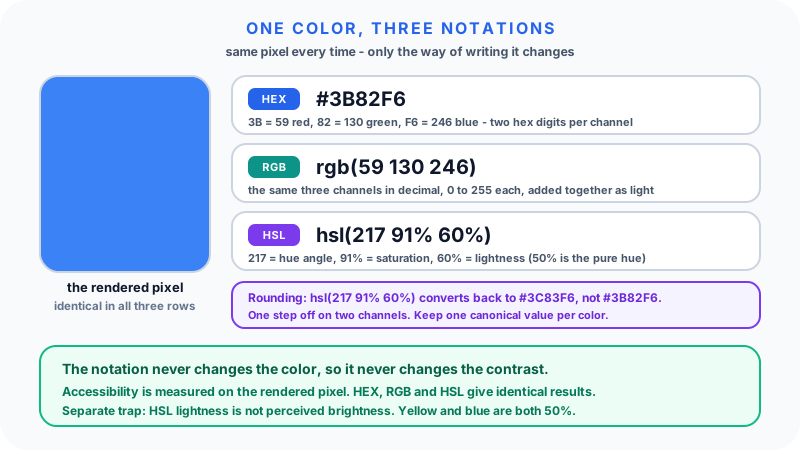
HEX, RGB and HSL are three ways of writing the same instruction to a screen: how bright to make the red, green and blue emitters in each pixel. They are notations, not different kinds of color. #3B82F6, rgb(59 130 246) and hsl(217 91% 60%) all light up the same pixel.
What differs is how easy each one makes a particular job. HEX is compact and copies cleanly. RGB says plainly what the hardware is being told to do. HSL separates a color into hue, saturation and lightness, which is how people describe color out loud and what makes systematic palette work possible. This guide covers what each one encodes, how to move between them by hand, where rounding costs you, and the one thing none of them decide.
The Short Version
- HEX writes each channel as two hexadecimal digits,
00toFF, in the order#RRGGBB. - RGB writes the same three channels as decimal numbers, 0 to 255.
- HSL rewrites the color as hue (0 to 360 degrees), saturation (0 to 100 percent) and lightness (0 to 100 percent).
- All three produce identical pixels. Choose by task, not by quality.
- Converting between them and rounding to whole numbers can shift a channel by one. Store one source of truth.
- The format has no effect on contrast or accessibility. Only the resulting color does.
How Screens Produce Color
Each pixel on a typical display contains three tiny emitters: red, green and blue. Varying their brightness produces every color the display can show. This is the additive model, and it is the opposite of mixing paint: all three at full brightness gives white, all three off gives black.
Every format on this page is ultimately describing the same three brightness values. HSL just gets there by a different route.
RGB
RGB states the three channel intensities directly, 0 to 255 each.
color: rgb(255 0 0);          /* pure red */
color: rgb(0 255 0);          /* pure green */
color: rgb(0 0 255);          /* pure blue */
color: rgb(255 255 255);      /* white  - all channels at maximum */
color: rgb(0 0 0);            /* black  - all channels off */
color: rgb(128 128 128);      /* mid gray */
Two syntaxes are in circulation. The older comma form, rgb(255, 87, 51), and the modern space-separated form, rgb(255 87 51), both work in current browsers. Alpha attaches with a slash in the modern form:
color: rgb(255 87 51 / 80%);   /* modern */
color: rgba(255, 87, 51, 0.8); /* legacy equivalent */
In CSS Color Module Level 4, rgba() is simply an alias for rgb(), and both accept alpha. You no longer need to switch function names to add transparency; MDN's <color> reference documents the accepted forms.
RGB is the honest, low-level view. Its weakness is editing. Making a color "a bit lighter" by raising all three channels flattens it toward gray, and shifting hue means changing all three at once in a non-obvious pattern.
HEX
HEX is RGB written in base 16. Two hexadecimal digits per channel, each covering 00 (0) to FF (255), in red-green-blue order.
color: #FF0000;   /* red    - rgb(255 0 0)   */
color: #00FF00;   /* green  - rgb(0 255 0)   */
color: #0000FF;   /* blue   - rgb(0 0 255)   */
color: #FFFFFF;   /* white  */
color: #000000;   /* black  */
color: #808080;   /* mid gray - 0x80 is 128  */
Hexadecimal uses 0-9 then A-F for the values 10 to 15, so two digits cover exactly 0 to 255, which is why one byte per channel and two hex digits per channel line up so neatly.
Four hex forms are valid:
| Form | Example | Meaning |
|---|---|---|
#RGB | #F09 | Each digit doubled: #FF0099 |
#RGBA | #F09C | Shorthand with alpha: #FF0099CC |
#RRGGBB | #FF0099 | The standard six-digit form |
#RRGGBBAA | #FF009980 | Six digits plus an alpha byte |
The shorthand is a digit-doubling rule, not a truncation. #F09 expands to #FF0099, so it can only express colors whose channel bytes are of the form XX. There is no three-digit way to write #3B82F6.
The alpha byte follows the same 0 to 255 scale: 80 in hex is 128, which is 128/255 = 50.2 percent opacity, not exactly 50. If you need exactly half, rgb(255 0 153 / 50%) is more precise than #FF009980.
HEX wins on compactness and on being unambiguous to copy and paste between design tools, tickets and code. It loses on readability: nothing about #7A4ECF tells you it is a medium purple until you render it.
HSL
HSL re-describes a color along three axes that match how people talk about color.
- Hue (H): position on the color wheel, 0 to 360 degrees. 0 red, 60 yellow, 120 green, 180 cyan, 240 blue, 300 magenta, 360 back to red.
- Saturation (S): 0 to 100 percent. 0 percent is gray; 100 percent is the most vivid version of that hue.
- Lightness (L): 0 to 100 percent. 0 percent is black, 100 percent is white, and 50 percent is the pure hue, not gray.
color: hsl(0 100% 50%);        /* pure red */
color: hsl(120 100% 50%);      /* pure green */
color: hsl(240 100% 50%);      /* pure blue */
color: hsl(0 0% 50%);          /* mid gray  - saturation 0 kills the hue */
color: hsl(0 100% 50% / 50%);  /* red at half opacity */
The comma form hsl(0, 100%, 50%) and the function hsla() still work and mean the same thing.
What HSL buys you is independent axes. Change lightness alone and you get a tint or a shade of the same color. Change saturation alone and you get a muted version. Change hue alone and you step around the wheel keeping the intensity. None of those are single-value edits in HEX or RGB.
One Color, Three Notations, Shown Properly
Take the blue #3B82F6.
HEX to RGB. Split into pairs and convert each from base 16:
3B= 3 x 16 + 11 = 5982= 8 x 16 + 2 = 130F6= 15 x 16 + 6 = 246
So #3B82F6 is rgb(59 130 246).
RGB to HSL. Scale each channel to 0-1, then find the range:
- r = 59/255 = 0.2314, g = 130/255 = 0.5098, b = 246/255 = 0.9647
- max = 0.9647 (blue), min = 0.2314, so delta = 0.7333
Lightness is the midpoint of max and min:
- L = (0.9647 + 0.2314) / 2 = 0.5980 = 59.8%
Saturation is delta expressed against how much room the lightness leaves:
- S = 0.7333 / (1 - |2 x 0.5980 - 1|) = 0.7333 / 0.8039 = 0.9122 = 91.2%
Hue depends on which channel is the maximum. Blue is, so H = 60 x (4 + (r - g) / delta):
- H = 60 x (4 + (0.2314 - 0.5098) / 0.7333) = 60 x 3.6203 = 217.2 degrees
Which gives hsl(217.2 91.2% 59.8%), conventionally written hsl(217 91% 60%).
| Notation | Value |
|---|---|
| HEX | #3B82F6 |
| RGB | rgb(59 130 246) |
| HSL | hsl(217 91% 60%) |
The rounding trap this exposes
Convert hsl(217 91% 60%) back to RGB and you do not get rgb(59 130 246). You get rgb(60 131 246), which is #3C83F6.
That is not a bug in the converter. HSL to RGB is exact; the loss happened when 217.2, 91.2 and 59.8 were rounded to whole numbers for readability. Two of the three channels landed one step away.
One step out of 255 is invisible on a screen, so this does not matter for a single decorative color. It matters when:
- You round-trip repeatedly through different tools and the drift accumulates.
- A build pipeline compares color strings for equality and now sees two different brand blues.
- A contrast ratio sits right on a 4.5:1 boundary and a one-step shift pushes it under.
The fix is to pick one canonical value per color, usually the HEX, keep it in a variable, and treat every other notation as a derived view. Convert with a tool such as the Color Code Converter rather than by hand when the exact bytes matter.
Common Colors Side by Side
| Color | HEX | RGB | HSL |
|---|---|---|---|
| Red | #FF0000 | rgb(255 0 0) | hsl(0 100% 50%) |
| Orange | #FF8800 | rgb(255 136 0) | hsl(32 100% 50%) |
| Yellow | #FFFF00 | rgb(255 255 0) | hsl(60 100% 50%) |
| Green | #00FF00 | rgb(0 255 0) | hsl(120 100% 50%) |
| Cyan | #00FFFF | rgb(0 255 255) | hsl(180 100% 50%) |
| Blue | #0000FF | rgb(0 0 255) | hsl(240 100% 50%) |
| Purple | #800080 | rgb(128 0 128) | hsl(300 100% 25%) |
| Mid gray | #808080 | rgb(128 128 128) | hsl(0 0% 50%) |
| White | #FFFFFF | rgb(255 255 255) | hsl(0 0% 100%) |
| Black | #000000 | rgb(0 0 0) | hsl(0 0% 0%) |
Accessibility: The Format Is Not the Question
This is the misconception worth killing outright. A color format cannot make text accessible or inaccessible. Contrast is computed from the rendered pixel's relative luminance, so #3B82F6, rgb(59 130 246) and hsl(217 91% 60%) produce byte-for-byte identical contrast results. Rewriting a stylesheet from HEX to HSL changes nothing an auditor would measure.
WCAG success criterion 1.4.3 requires a contrast ratio of at least 4.5:1 for normal text and 3:1 for large text. Those are properties of a color pair, and the Color Contrast Checker will accept any of the three notations and give the same answer.
There is a real trap nearby, though, and it is specifically an HSL one: lightness is not luminance. Both of these have L = 50 percent:
hsl(60 100% 50%), pure yellow, relative luminance 0.928hsl(240 100% 50%), pure blue, relative luminance 0.072
Against a white background, the yellow gives a contrast ratio of about 1.07:1 (illegible) and the blue about 8.59:1 (comfortable). Identical HSL lightness, thirteen-fold difference in measured contrast, because the human eye and the WCAG formula weight green far above blue.
So the practical rule: HSL lightness is an excellent handle for building a palette that looks coherent, and a poor proxy for whether text on it will be readable. Generate with HSL, then check every text pair with a contrast tool. How Color Contrast Works for Accessibility goes through the measurement itself.
If perceptual uniformity is what you actually want, CSS Color 4 defines oklch() and oklab(), where equal changes in the lightness value correspond much more closely to equal perceived changes. They are the better foundation for a generated palette; HSL remains the more widely understood one.
Choosing a Format in Practice
Reach for HEX when writing CSS by hand, defining brand colors in a style guide, or pasting values between design tools and code. It is the most portable and the least ambiguous.
Reach for RGB when code is doing arithmetic on channels, when you are working with raw pixel or canvas data, or when you want channel values stored separately so alpha can be applied later:
:root { --brand-rgb: 59 130 246; }
.card       { background: rgb(var(--brand-rgb)); }
.card-faded { background: rgb(var(--brand-rgb) / 12%); }
That pattern is worth knowing because it solves the awkward case of needing one brand color at several opacities without hard-coding a separate value for each.
Reach for HSL when generating a scale from a base color, building light and dark themes where the two differ mainly in lightness, or rotating hue at fixed saturation and lightness to produce a categorical palette.
A workflow that holds up in a real design system: reason in HSL, store in HEX, apply in RGB when alpha or math is involved. One canonical HEX per token, derived values generated once at build time rather than converted repeatedly by hand.
Mistakes That Cost Time
Assuming lightness 50 percent is gray. It is the pure hue. Gray is saturation 0 percent at any lightness.
Lightening by raising RGB channels equally. That desaturates as it brightens. Use HSL lightness, or color-mix(), if you want a tint that keeps its character.
Reading hex as decimal. FA is 250, not 1010. #404040 is rgb(64 64 64), not rgb(40 40 40).
Assuming shorthand truncates. #F09 is #FF0099. It does not mean #F00990 or anything else, and most colors have no shorthand form at all.
Expecting hex alpha to be a percentage. The last two digits are a 0-255 byte. 80 is 50.2 percent, CC is 80 percent, 1A is about 10 percent.
Mixing notations across a codebase. All three work, but a file with HEX in some rules and HSL in others is harder to diff, harder to search, and hides duplicate colors from you.
Treating HSL hue as ordinary degrees. It wraps: 350 degrees to 10 degrees is a 20-degree step, not a 340-degree one. Palette generators that do not handle the wrap produce a gap at red.
Worked Scenarios
Building a brand scale. Base #3B82F6 is hsl(217 91% 60%). Hold hue and saturation, vary lightness only: 95%, 85%, 75%, 60% (base), 45%, 35%, 25%. The result reads as one family because only one axis moved. Then check the text pairs, because as the section above showed, even lightness steps do not mean even contrast steps.
A hover state. #10B981 is hsl(160 84% 39%). Reducing lightness by six points to hsl(160 84% 33%) darkens it without shifting the color. Doing the same thing in RGB means adjusting three numbers and hoping.
A modal overlay at half transparency. rgb(0 0 0 / 50%) is the clearest. #00000080 is 50.2 percent and fine in practice; hsl(0 0% 0% / 50%) is equivalent but wordier for a neutral.
Auditing an inherited stylesheet. Convert everything to one notation first, then deduplicate. Teams routinely discover that #3B82F6, rgb(59,130,246) and hsl(217,91%,60%) in three different files were always the same token.
FAQ
Are HEX, RGB, and HSL the same color? They are three notations for the same color. #FF0000, rgb(255 0 0) and hsl(0 100% 50%) all describe pure red and render identically.
How do I convert HEX to RGB? Split the six digits into three pairs and convert each pair from base 16 to decimal. 3B = 3 x 16 + 11 = 59, 82 = 130, F6 = 246, so #3B82F6 is rgb(59 130 246).
Which color format is best for CSS? None is technically better; they compile to the same pixel. HEX is the most compact and portable, HSL is the easiest to generate variations from, and RGB is the most convenient when channels are stored separately for reuse with alpha.
Can I use a 3-digit HEX code? Yes, when each channel's two digits are identical, because the shorthand works by doubling each digit. #F09 means #FF0099. Most colors, including #3B82F6, have no three-digit form.
What does the alpha channel do? It sets opacity, from fully transparent to fully opaque. In modern CSS it is a slash-separated fourth value, rgb(255 0 153 / 80%) or hsl(217 91% 60% / 80%); in hex it is a fourth byte, #FF009980.
Does the color format affect accessibility? No. Contrast is calculated from the rendered color, so all three notations give identical results. Watch out for the separate trap that HSL lightness is not perceived brightness: pure yellow and pure blue are both 50 percent lightness but differ enormously in contrast against white.
What is the difference between HSL and HSV? Both start from hue and saturation. HSL's third axis is lightness, where 100 percent is white and 50 percent is the pure hue. HSV's is value, where 100 percent is the pure hue at full brightness and white requires saturation 0. HSL is the one CSS supports.
Related Tools
The Color Code Converter moves a color between HEX, RGB and HSL without the hand arithmetic or the rounding mistakes. The Color Contrast Checker takes any of the three notations and measures a text and background pair against the WCAG thresholds.
Related Articles
- How Color Contrast Works for Accessibility
- Pixel, REM, EM, and VW Explained for Responsive Design
- How to Resize and Compress Images for the Web
References
- MDN Web Docs,
<color>CSS data type - W3C, CSS Color Module Level 4
- W3C WAI, Understanding SC 1.4.3: Contrast (Minimum)
Final Thoughts
The three formats are windows onto one number, not three grades of color. Learn to read hex pairs as bytes, learn what HSL's three axes buy you, and keep one canonical value per color so rounding never turns one brand blue into three. Then check contrast on the rendered result, because that is the only place where the choice of notation genuinely does not help you.