
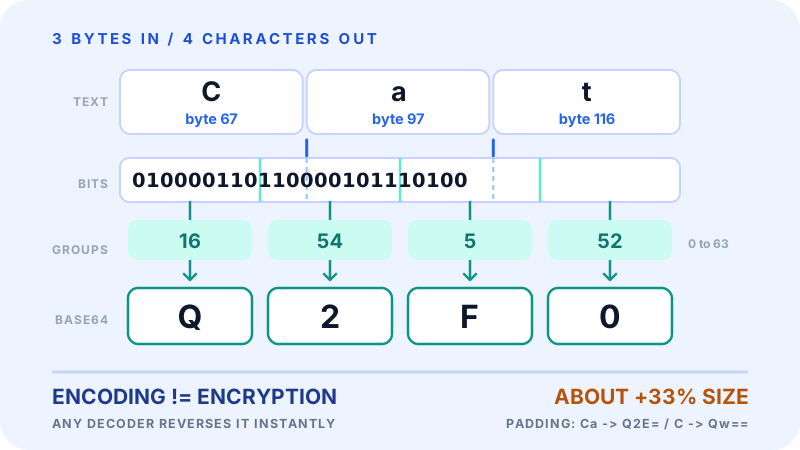
The short answer: Base64 is a way of writing binary data using only 64 printable text characters, so it can travel safely through systems that were built for text. It is not encryption, it is not compression, and it protects nothing. It solves exactly one problem: getting arbitrary bytes through a text-only channel intact.
If you have seen a string like iVBORw0KGgoAAAANS... in an HTML attribute, a JSON payload, or an email source, that is Base64.
Key Takeaways
- Base64 represents binary data as ASCII text using 64 characters: A-Z, a-z, 0-9, and two extras (usually
+and/). - Every 3 bytes in become 4 characters out, so the output is about 33% larger.
- Short inputs are padded with
=so the output length is always a multiple of 4. - Common uses: email attachments, data URIs, JSON payloads, JWTs, config files.
- Base64 is not encryption. Anyone can decode it instantly, with no key.
What "Encoding" Actually Means
Encoding is re-writing the same information in a different alphabet. Nothing is added, nothing is hidden, and the process is fully reversible by anyone who knows the scheme, which in Base64's case is everyone.
That is worth separating from two things it is often confused with:
- Compression rewrites data to make it smaller. Base64 makes it larger.
- Encryption rewrites data so that only a key holder can read it. Base64 needs no key.
Base64 is a transcription, not a transformation.
Why Binary Sometimes Has to Be Text
A lot of infrastructure was designed to carry text, not arbitrary bytes:
- Email (SMTP) historically carried only 7-bit ASCII
- JSON and XML are text formats; raw binary breaks the parser
- URLs treat characters like
?,&, and#as syntax - HTTP headers are text fields
- Log files and config files are read and edited as text
A JPEG contains byte values that look like control characters, line breaks, or syntax markers to those systems. Feed it in raw and something downstream truncates it, mangles it, or refuses it. Base64 converts those bytes into characters every one of those systems already handles, and the receiver converts them back.
How the Encoding Works
Base64 takes 3 bytes (24 bits) of input and re-splits the same 24 bits into 4 groups of 6 bits. Each 6-bit group is a number from 0 to 63, and each number maps to one character:
- 0 to 25: uppercase
AtoZ - 26 to 51: lowercase
atoz - 52 to 61: digits
0to9 - 62 and 63: usually
+and/
That is 64 characters, hence the name. Note what changed: not the bits, only where the dividing lines fall. 8-bit boundaries become 6-bit boundaries.
Worked Example: Encoding "Cat"
"Cat" is 3 bytes:
C = 67  = 01000011
a = 97  = 01100001
t = 116 = 01110100
Joined into one 24-bit run and re-split into groups of 6:
010000 110110 000101 110100
    16     54      5     52
Look those numbers up in the alphabet above:
16 -> Q 54 -> 2 5 -> F 52 -> 0The Base64 of "Cat" is Q2F0. Three characters in, four characters out.
Padding With "="
If the input is not a multiple of 3 bytes, the encoder fills the last group with zero bits and marks the shortfall with =:
"Cat" (3 bytes) -> Q2F0    no padding
"Ca"  (2 bytes) -> Q2E=    one padding character
"C"   (1 byte)  -> Qw==    two padding characters
The = characters are not data. They exist so the output length is always a multiple of 4, which tells the decoder how many bytes to expect. Some decoders accept unpadded input, some reject it, so keep the padding unless a spec tells you to strip it.
How Decoding Works
Decoding is the same trip in reverse: map each character back to its 6-bit value, concatenate the bits, then re-split on 8-bit boundaries.
Q2F0  ->  16, 54, 5, 52
      ->  010000 110110 000101 110100
      ->  01000011 01100001 01110100
      ->  67, 97, 116  ->  "Cat"
Two things follow from this. First, decoding needs no key, no password, and no permission. Second, decoding is not validation: a string can decode cleanly and still contain garbage, because Base64 says nothing about what the bytes mean.
Why the Output Is About 33% Larger
Four output characters carry three input bytes, so the size ratio is 4/3. That is a 33% increase, plus up to two padding characters and, in MIME contexts, line breaks.
| Input size | Base64 output (no line breaks) |
|---|---|
| 100 bytes | 136 characters |
| 1 KB | about 1.34 KB |
| 1 MB | about 1.33 MB |
| 10 MB | about 13.3 MB |
There is no way around this with a 64-character alphabet: 64 is 2^6, so each character can only ever carry 6 of the 8 bits in a byte. For a small icon or a token the overhead is irrelevant. For a 10 MB email attachment, once MIME line breaks are added, it is about 3.7 MB of pure packaging.
Where You Will Meet It
Data URIs in HTML and CSS. Embed a small asset directly in the markup so it needs no separate request:
<img src="data:image/png;base64,iVBORw0KGgoAAAANS...">background-image: url("data:image/svg+xml;base64,PHN2Zy...");Worth it for tiny assets. Above roughly 10 KB the size penalty and the loss of separate browser caching usually outweigh the saved request.
Email attachments (MIME). Email bodies are text, so clients Base64-encode attachments into the message and the receiving client decodes them back.
JSON web tokens. A JWT is three Base64URL-encoded sections joined by dots. The encoding makes the token safe to put in a header or a URL. It also means the header and payload are readable by anyone holding the token, which is why you do not put anything confidential in them.
HTTP Basic Authentication. The Authorization header carries username:password Base64-encoded. That is transport packaging, not protection. Anyone who sees the header can decode the credentials, which is why Basic auth requires HTTPS.
Config files and API payloads. YAML, JSON, and INI files use Base64 to carry certificates or small binary blobs as ordinary string values, and JSON APIs use it to accept small file uploads inside a request body.
Base64 Variants
- Standard Base64 (RFC 4648) uses
+and/. - Base64URL (also RFC 4648) swaps those for
-and_, so the output is safe in URLs and filenames without further escaping. This is what JWTs and OAuth use, often with padding stripped. - MIME Base64 is standard Base64 with a line break every 76 characters for email compatibility.
They are not interchangeable. Decoding Base64URL with a standard decoder, or the reverse, produces either an error or the wrong bytes.
Base64 Is Not Encryption
This is the misunderstanding worth spelling out, because it turns into real incidents.
Base64 has no key. The mapping is public and fixed. Any decoder, including BlinkCalc's Base64 tool, reverses it in under a second. aGVsbG8= is just hello wearing a different alphabet.
So Base64 does not make something safe to log, safe to commit, safe to paste into a ticket, or safe to put in a URL. If a value would be sensitive as plain text, it is equally sensitive Base64-encoded. Encoded data still needs the same handling as the original.
What Base64 legitimately does in a security context is package output that is already protected. Encrypt with a real algorithm, hash a password with bcrypt or Argon2, then Base64-encode the resulting bytes if they need to travel as text. The protection comes from the encryption or hashing. Base64 is only the envelope.
Common Mistakes
Treating Base64 as a security measure. It is reversible by anyone, instantly, with no key.
Assuming decoding proves anything. A JWT that decodes is not a JWT that is valid. Verification is a separate step against a signature.
Using standard Base64 in a URL. + and / have meaning in URLs and paths. Use Base64URL, or percent-encode with the URL Encoder and Decoder.
Mishandling padding. Stripping = for one system and feeding the result to a stricter decoder is a common source of "invalid input" errors.
Embedding large images as data URIs. It inflates your HTML or CSS, blocks the browser from caching the asset separately, and delays first render. Keep data URIs for small assets.
Expecting it to shrink anything. Base64 output is always larger than the input. If you need both smaller and text-safe, compress first, then encode.
Confusing it with hex. Both turn bytes into text. Hex uses 16 characters and doubles the size (100% overhead, 2 characters per byte). Base64 uses 64 characters and adds about 33%.
Hex vs Base64
| Feature | Hex (Base16) | Base64 |
|---|---|---|
| Alphabet | 0-9, A-F (16 characters) | A-Z, a-z, 0-9, +, / (64 characters) |
| Size overhead | 100% (2 characters per byte) | About 33% |
| Readability | Easy to read byte by byte | Hard to read by eye |
| Typical uses | Colour codes, hashes, low-level debugging | Binary inside text formats |
| Case sensitivity | Often treated as case-insensitive | Case-sensitive |
Hex wins when a human needs to read individual bytes. Base64 wins when the payload has to be compact.
Practical Scenarios
Scenario 1: A small inline icon. A 1 KB SVG becomes about 1.34 KB as a data URI and saves one request. Reasonable for something tiny that appears on every page.
Scenario 2: A photo upload through a JSON API. The app reads the file as bytes, Base64-encodes it, and puts the string in the request body. The server decodes it back to bytes before saving. Simple, at the cost of 33% more bandwidth than a multipart upload.
Scenario 3: An email attachment. A 5 MB PDF travels as roughly 6.8 MB of Base64 inside the message and arrives as a 5 MB PDF again.
Scenario 4: A certificate in a config file. A PEM certificate is already Base64 text between header and footer lines, which is exactly why it drops into a YAML value without escaping.
Scenario 5: A JWT. A short JSON payload becomes a compact Base64URL string that survives being put in an Authorization header. Readable to anyone who has it, trustworthy only if the signature checks out.
FAQ
What does Base64 do? It rewrites binary data as ASCII text using 64 safe characters, so bytes can pass through systems that only handle text reliably.
Is Base64 encryption? No. It is a public, reversible encoding with no key. It provides no confidentiality at all.
Is Base64 compression? No. It makes data about 33% larger.
Why is Base64 about 33% larger? Each output character carries 6 bits, while each input byte is 8 bits. Four characters are needed per three bytes, and 4/3 is about a 33% increase. The exact figure varies: padding makes very short inputs proportionally larger (1 byte becomes 4 characters), and MIME line breaks add a little more.
What are the = characters at the end? Padding. They fill the output out to a multiple of 4 characters when the input was not a multiple of 3 bytes. They carry no data.
What is the difference between Base64 and Base64URL? Base64URL replaces + and / with - and _ so the result is safe in URLs and filenames. It is common in JWTs and OAuth, often without padding.
When should I use Base64? When binary data has to sit inside a text format: an email body, a JSON field, a data URI, a config value, or a token.
When should I avoid it? Whenever a real binary channel is available. A direct file upload or a linked image file is smaller, cacheable, and faster than the encoded equivalent.
Related Tools
The Base64 Encoder and Decoder converts text in both directions in your browser. For images specifically, Image to Base64 builds the data URI and Base64 to Image turns a string back into a viewable file. For percent-encoding rather than Base64, use the URL Encoder and Decoder.
Related Articles
Final Thoughts
Base64 is infrastructure you barely notice until you need it, and then it is everywhere: in emails, tokens, stylesheets, and API bodies. The mental model fits in two lines. It costs about 33% in size, and it buys safe passage through text-only systems. It buys nothing else, and in particular it buys no secrecy, so treat encoded data exactly as carefully as you would treat the original.